
ProductsSoftphoneDesktop app
Transferring Calls
Blind and attended call transfer on CloudPLAY Softphone desktop.
During an active call, open Transfer (sometimes labelled Call forward) to send the call to another person. Two types are available.
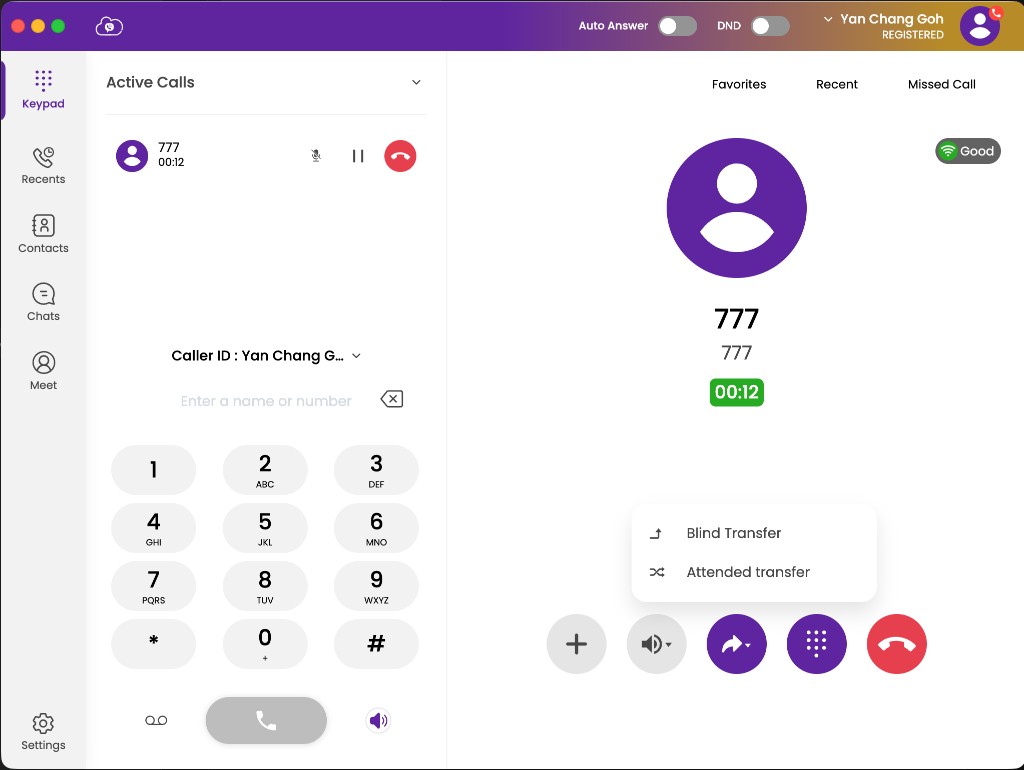
Blind transfer
Immediately redirects the caller without speaking to the recipient first. Use when you are confident the recipient is available.
- During the call, click Transfer.
- Choose Blind Transfer.
- Enter the extension or phone number.
- Confirm — the call transfers immediately and you are disconnected.
Attended transfer
Lets you speak with the recipient before connecting the caller. The caller is placed on hold while you talk.
- During the call, click Transfer.
- Choose Attended Transfer (also called Attendant Transfer). The caller is held.
- Dial the recipient and wait for them to answer.
- Brief them on who is calling and why.
- Complete the transfer to connect the caller.
Recipient does not answer
If the recipient does not answer during an attended transfer, the original caller is typically returned to you.
When to use which
| Situation | Recommended |
|---|---|
| Sending to a known available colleague | Blind transfer |
| VIP or upset caller | Attended transfer |
| Unsure if recipient is free | Attended transfer |
| Sending to voicemail or a queue | Blind transfer |
If transfer fails
- Confirm Softphone is registered before transferring.
- Try attended transfer to verify the recipient is available.
- See Troubleshooting.
Desk phone transfer steps: CloudPLAY Talk — Making calls.