
ProductsSoftphoneDesktop app
In-Call Controls
Mute, hold, dial pad, and volume during an active CloudPLAY Softphone desktop call.
During an active call, Softphone shows controls for managing the conversation.
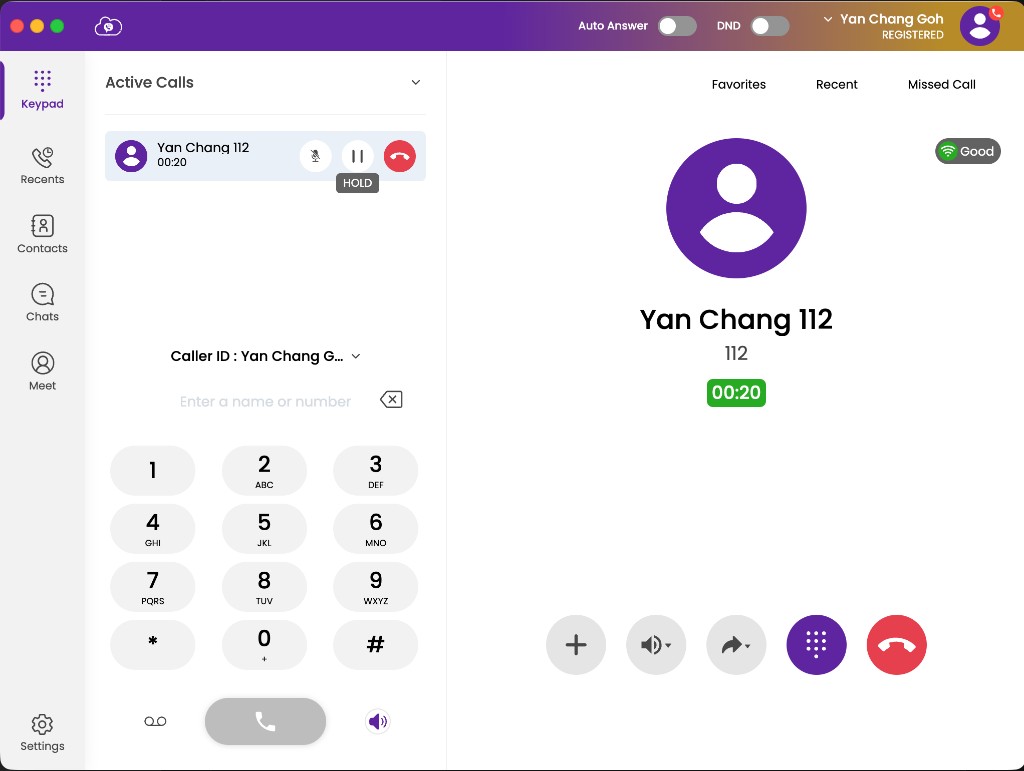
Control reference
| Control | Function |
|---|---|
| Mute | Turns your microphone off. Click again to unmute. |
| Hold | Puts the caller on hold. Click again to resume. |
| Transfer / Forward | Opens transfer options — see Transfers. |
| Dial pad | Sends DTMF tones for IVR menus, extensions, or PIN entry during a call. |
| End call | Hangs up. |
Mute
Use Mute when you need to speak privately or reduce background noise. The other party cannot hear you until you unmute.
Hold
Use Hold to pause the conversation. The caller typically hears hold music or silence until you resume.
Dial pad during a call
Open the in-call dial pad when an automated system asks you to press digits (for example “press 1 for sales”) or when entering a voicemail PIN.
Output volume
Adjust output volume from Softphone sound settings (or the dial pad volume control) so you can hear the other party clearly. Prefer a headset in open offices to reduce echo.
Related
- Transfers
- Status & settings — sound devices and ringtones